

Say it in the group. Any model, one memory. On your own machine.


Website · 简体中文 · Install guide · Releases
SintBot is a self-hosted daemon that puts a coding agent in your team's group chat. You bind a group to a project directory, and then anyone in that group can hand it work. It reads and changes code, designs, runs scripts and reports back, all on your own machine.
Each turn runs the official Claude Code or Codex CLI headless, so tools, MCP servers, skills and project memory behave just as they do in your terminal. Each group chooses its model: Claude, GPT, DeepSeek, GLM, MiniMax, Kimi, or one you host yourself.
Full source, docs and tests are public and downloadable under the PolyForm Shield License 1.0.0.
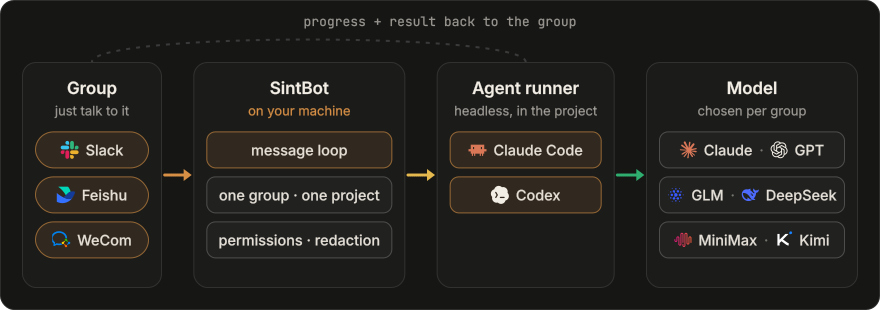
- One group, one project. Each group gets its own project directory, session, queue, permissions and scheduled tasks.
- Same agent, any brain. Switch models with
/modelin the chat. The project'sCLAUDE.md,AGENTS.mdand memory carry over to whichever agent runs next. - Stays on your machine. Projects, sessions, memory and logs live on your disk and never pass through a SintBot server. Prompts and the code the model reads still go to the provider you chose.
- No public IP. Every platform uses an outbound long connection (Socket Mode on Slack). One daemon can serve Slack, Feishu and WeCom at the same time.
1. Install on macOS or Linux:
curl -fsSL https://sintbot.com/install.sh | bashThe script checks for Node.js 22+, installs sintbot, sets up a model with a live trial turn and offers to install the background service, then opens the console at http://127.0.0.1:4600. It asks before every change and never uses sudo. Read install.sh first, or add --dry-run to see what it would do.
To install by hand instead:
npm i -g sintbot
sintbot setup             # set up a model, with a live trial turn
sintbot service install   # restarted on crash, started at login; the console stays at http://127.0.0.1:4600
2. Connect a chat platform in the console. Create a bot, add it to a group and enter its credentials under Settings; each platform has a step-by-step guide there and here: Slack · Feishu · WeCom. Then bind the group to a project folder under Groups.
3. @ the bot in your group. Switch models and watch live activity in the same console.
The wizard checks what this machine is logged in to and recommends in this order:
| You have | Use | What to do |
|---|---|---|
| A Claude subscription (Pro / Max) | Claude | run claude auth login before the wizard |
| A ChatGPT account | GPT, via Codex | npm i -g @openai/codex, then codex login |
| Neither | DeepSeek (recommended) | sign up at platform.deepseek.com, top up, create an API key and paste it into the wizard; it runs a trial turn on the spot |
The other presets are Zhipu GLM, MiniMax and Volcano Ark. GLM and MiniMax also have international sites (Z.ai, minimax.io); the wizard finds out which site your key belongs to by trying it. Kimi and any other Anthropic-compatible endpoint can be added as custom endpoints in the console.
Without a Claude subscription, Claude Code is only the agent framework and needs no login. The only features you lose are GPT groups and image generation, both of which borrow Codex. In mainland China, see the Chinese README.
| Area | What it does |
|---|---|
| In the group | Streaming progress: Slack shows its native "Working…" status and a Stop button; Feishu cards update in place. Messages that arrive mid-turn are merged into the next turn. |
| Commands | /help · /status · /model <name> · /stop · /skip · /new · /hud · /issue. On Slack, use a ! prefix because Slack consumes messages that start with /. |
| Permissions | Set per group, read-only by default. Thirteen secret and PII patterns are masked before a message reaches the group. |
| Scheduled tasks | Cron, aliases such as daily, or plain "every day at 09:00". A task can wake the agent, post a reminder or run a script. |
| Design | Distill a style from a site, a project folder or an image you like, or start from sixteen built-in styles. The result is a per-project DESIGN.md the agent must read, and every hand-off is checked against it. Iterate by annotating Feishu whiteboards. |
| Images | Generated with the machine's Codex subscription, so no API key is needed. Edit an existing image, repaint a masked region, or produce a transparent background. |
| Previews & browser | HTML prototypes are served on your LAN for the group to see. When the bot's browser hits a login or captcha, a group member takes over through a one-time link. |
| Console | One local page for every group: a "Needs you" list (failed turns with their reason, takeover requests, open feedback), projects, models, permissions, design library, live activity and release history. Available in English or Chinese. |
| Operations | Turns are capped at 30 minutes, and at most two run at once. Turns interrupted by a restart are redone automatically. Includes sintbot doctor, an ops alert group and quota warnings. |
sintbot doctor                    # health check: config, CLIs, models, platforms, groups
sintbot service status | logs     # is the service up, and what is it doing
sintbot agent run "…"             # a read-only trial turn in the current directory
sintbot ui                        # open the console
sintbot chat -C <project-dir>     # simulate group messages in the terminal, no chat platform needed
sintbot help                      # all commands
Configuration lives in ~/.sbot/config.json. See docs/config.md for the fields, or the annotated sbot.config.example.json. The package installs two equivalent commands, sintbot and sbot.
| Area | Status |
|---|---|
| macOS | Verified. Real-machine testing covered the main flows on Slack and Feishu: messaging, streaming progress, model switching and scheduled tasks. |
| Linux | Experimental. The systemd unit is covered by unit tests but has not yet been installed on real hardware. |
| Windows | Not verified. Install manually; sintbot service install prints the NSSM and pm2 commands to run. |
| WeCom | The newest integration, with the least real-world use. |
| Slack | The native Stop button, !status and the thread buttons are covered by tests but have had little real-world use. |
| Kimi | Not a preset and not yet tested. Add it in the console as a custom endpoint (Models → Add model → Custom); if you try it, please report how it went. |
"Feishu" here means the China edition (open.feishu.cn). The international Lark (larksuite.com) runs on a separate open platform and is not supported yet. The bot's built-in messages and sintbot doctor are in Chinese; the installer, the setup wizard and the console also speak English.
- The bot executes commands in the bound project directory. Permissions are set per group: read-only by default, with "full access" for groups you trust. File tools are confined to the project directory; shell commands are not sandboxed. See docs/security.md.
- The console listens on this machine only. Before opening it to your LAN, run
sintbot ui --set-password. - Personal Claude or ChatGPT subscriptions may not permit multi-user groups; check the provider's terms before team use.
Do I need a Claude subscription?
No. If the wizard finds no Claude or Codex login, it recommends DeepSeek and runs a trial turn as soon as you paste the API key. Claude Code is still the agent framework; it just needs no login.
Can I use it in mainland China?
Yes. Use Feishu as the chat platform and DeepSeek (or the mainland sites of Zhipu GLM, MiniMax or Kimi) as the model: they connect directly, with no proxy. A proxy is needed only for Claude, ChatGPT or Slack.
Do I need a server or a public IP?
No. SintBot runs on a computer you keep on; a Mac is the tested setup. It only makes outbound connections: Socket Mode for Slack, a WebSocket long connection for Feishu and a long connection for WeCom. The console stays local unless you open it.
Does switching models lose the project's memory?
No. A switch starts a fresh conversation, but the project's CLAUDE.md, AGENTS.md and memory directory are handed to whichever agent runs next. Long sessions are compacted automatically.
How is it different from cc-bot?
Both are free. cc-bot is a Claude Code plugin: it runs inside your own interactive session, on that session's model. SintBot is a standalone daemon: no one has to keep a terminal open, each group has its own project, model and permissions, it drives both Claude Code and Codex, and it comes with a local console.
| Topic | Docs |
|---|---|
| Getting started | Install · Models · Configuration · Security · Features |
| Chat platforms | Slack · Feishu · WeCom |
| Features | Whiteboard · Previews · Browser · Icons · Codex runner · Public console access |
| Project | Architecture (DESIGN.md) · Contributing · Changelog |
Please report bugs and request features in GitHub Issues. Include the following, with secrets redacted:
sintbot version- your OS
- your chat platform
- the output of
sintbot doctor
Report security issues privately through GitHub Security Advisories; see SECURITY.md.
Full source, docs and tests are public and downloadable under the PolyForm Shield License 1.0.0 © WaterTian. The license text governs.
- You may use, modify and run it for yourself, your team or your company.
- You may not use it to offer a product that competes with SintBot, paid or free.