

Build in your app. Publish or install one module.
Turn a custom Open Mercato module into an npm package and a dedicated GitHub repository.
One CLI for creating, publishing, installing, and linking modules.


npx create-mercato-module init visits
# Build your feature in src/modules/visits.
npx create-mercato-module publish visits
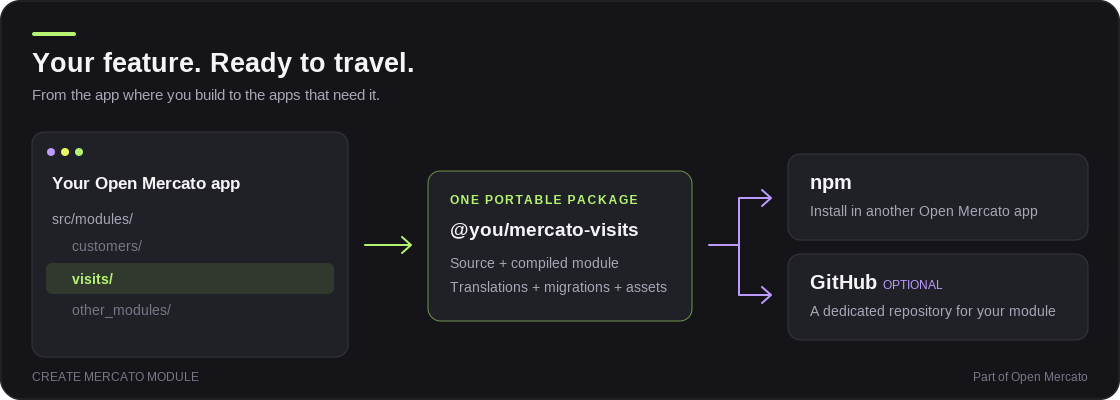
Your application is the development workspace. This tool creates a portable package from one selected module, including its sources, compiled code, translations, and migrations. Publish it to npm, optionally give it a dedicated GitHub repository, and install it in another Open Mercato app.
Already built the module? Skip init and go straight to publish.
Quick start · Existing modules · Cloud sandboxes · Dry run · Commands · Docs · Discord
You need Node.js 24+, Yarn 4, and Docker. On Windows, use WSL2. Already inside an installed app or Cloud sandbox? Skip step 1.
npx create-mercato-app@latest my-app --preset empty
cd my-app
cp .env.example .env
docker compose up -d
yarn install
Follow the scaffold prompts to choose your AI coding tools. This tool's release checks run against the latest create-mercato-app release. See the Open Mercato installation guide for setup details.
npx create-mercato-module init visits
yarn setup
init asks for a one-sentence description, which npm and the catalog show, then creates src/modules/visits, registers it as @app, and runs generation. yarn setup initializes your new app and starts its development server; leave it running. Open /backend/visits using the app credentials printed in the terminal, then build your feature in src/modules/visits.
The scaffold is a starting point: one page and its translations. From here you will probably want a coding agent to build the module out. The app already carries agent instructions (AGENTS.md) for the tools you chose in step 1, so open the app in your agent once yarn setup is running and describe the feature, for example: "In src/modules/visits, add a Visit entity with a list page and a create form." Keep the dev server running so you can check each change at /backend/visits.
If your app is already initialized and running, use only init and continue with its existing dev server.
Open another terminal in the app directory:
cd my-app
npm login
gh auth login # only if you want a dedicated GitHub repository
npx create-mercato-module publish visits
The wizard asks for the npm package name, version, optional GitHub repository, and public or restricted access. It builds an archive, shows the destinations and any warnings, and publishes only after you retype the package name. Complete npm's 2FA verification when requested.
Give the package a name of its own, such as @your-name/mercato-visits. A name that only repeats a module ID, such as @your-name/visits, can match a module already listed in Open Mercato Modules, and the catalog then asks a curator to check the name before listing it.
Settings are remembered in .mercato/module-tool.json; later releases reuse them and default to the next stable patch version. Use --configure to change them. Your app's module, other modules, and Git origin stay in place.
Run inside the receiving app, for example with a module already on npm:
npx create-mercato-module install @fastwhitecat/integration-ksef-direct@0.1.8Your own module installs the same way under its package name, such as @your-name/mercato-visits, once npm makes the published version available.
Apps created by create-mercato-app install npm versions only 5 days after
publication (Yarn npmMinimalAgeGate). To install a new version sooner, add
--preapprove-package: it adds only this package to the app's
npmPreapprovedPackages. Without the option, install explains the wait and,
in a terminal, asks before changing anything.
install delegates registration and generation to Open Mercato, and also
accepts a dedicated GitHub repository when the package is not on npm:
npx create-mercato-module install your-name/mercato-visits
npx create-mercato-module install your-name/mercato-visits@1.2.3
npx create-mercato-module install https://github.com/your-name/mercato-visits.git
Scoped npm packages, npm:unscoped-package, GitHub URLs, owner/repository,
and a bare repository name for your authenticated GitHub account are supported.
Use --eject for packages that allow source ejection, or --module <module_id>
to choose one module from a multi-module package. GitHub installs use the
current default-branch head unless owner/repo@version-or-ref, owner/repo#ref,
or --ref <tag-or-commit> selects another ref. Like npm's package@1.2.3,
owner/repo@1.2.3 selects a version: it tries the exact 1.2.3 ref first,
then v1.2.3 only if the exact ref is missing. publish tags every release
with its bare version, so this works for repositories released by this tool. Prereleases such as
@1.2.3-beta.1 follow the same rule. #ref and --ref always select an exact
Git ref. The resolved full commit is pinned in every case.
If src/modules/visits/index.ts already exists, publish it directly:
npx create-mercato-module publish visits \
  --package @your-name/mercato-visits \
  --repo your-name/mercato-visits
Keep developing locally and run the same command for later releases. The app can have its own Git repository or no Git repository at all.
Run inside any Open Mercato app. Give link a repository or an npm package:
npx create-mercato-module link your-org/your-module
# These work too:
npx create-mercato-module link https://github.com/your-org/your-module.git
npx create-mercato-module link @your-org/your-module
The npm form discovers the GitHub repository from the package's npm metadata. The package name and module ID come from the repository; no npm package name prompt or prior init is needed. A bare repository name uses your authenticated GitHub account unless an unsaved local module has the same name; in that legacy case, the command asks for its dedicated repository. Use owner/repository to remove the ambiguity. If the package has no dedicated module repository, the command explains how to fix it.
Optionally name the local checkout folder:
npx create-mercato-module link your-org/your-module my-checkoutThe tool clones under .mercato/module-repos/my-checkout (default: the module ID), links src/modules/your_module (the module ID the repository declares), registers it as @app, and runs generation. Existing local source is backed up. The local folder name does not change the module ID, routes, or imports.
Edit through the app, then release from the linked repository using the saved package and repository settings (this needs push access to the repository and publish rights for its npm package):
npx create-mercato-module publish your_modulePublication includes your linked edits, preserves repository customizations, and suggests the next patch version. link your_module still works when the repository is saved. For a new local module of your own, such as visits, publish it with publish visits --repo owner/repo before linking it.
To make it an ordinary local module again, run npx create-mercato-module unlink your_module: it copies the checkout's current source into src/modules/your_module and keeps the checkout and the earlier backup.
This link is local: a fresh clone of the whole app needs the module source restored or linked again. See repository development and PR workflow for details.
The sandbox already contains an installed app. From its terminal in /workspace:
npx create-mercato-module init visits
npx create-mercato-module publish visits
The app keeps its repository while the selected module gets its own package and optional repository.
npx create-mercato-module publish visits \
  --package @your-name/mercato-visits \
  --dry-run
This builds a real .tgz under .mercato/module-publish/, without login or publication. See the command reference for repository, version, access, and automation options.
Open Mercato Modules, the catalog at modules.openmercato.com, lists official and community modules for people and coding agents. After a public release, publish prints the submit link for your package and the page the catalog gives the module once it is listed. To prepare the entry yourself:
npx create-mercato-module describe visitsIt prints the catalog entry from your saved publish settings; --open also opens the submit page. Published packages carry the open-mercato and open-mercato-module keywords, and dedicated repositories get the open-mercato-module and open-mercato topics.
| Topic | Guide |
|---|---|
| Commands and flags | Command reference |
| Login and npm tokens | Authentication |
| GitHub Actions without a write token | Trusted Publishing |
| Contents, dependencies, and portable imports | Package contents |
| List your module in Open Mercato Modules | List your module |
Errors mentioning .mercato/generated |
Generated-import errors |
| Settings, Git, and releases | Release behavior |
| Run the unreleased GitHub version | GitHub installation |
| Contribute and run checks | Development |
| Verify clean app installs from npm and GitHub | Release tests |
Part of Open Mercato. Website · Framework docs · Cloud · Discord
MIT © Open Mercato contributors. See LICENSE.