
a tool using arduino board and nrf24l01 as adapter to control the Miniware MDP-P906 power supply.
MDP-P906 is a Digital Power Supply Laboratory Programmable Linear Power Supply. It works great by itself. But during my use, I want to control it using a script on PC rather than the MDP-M01 module.
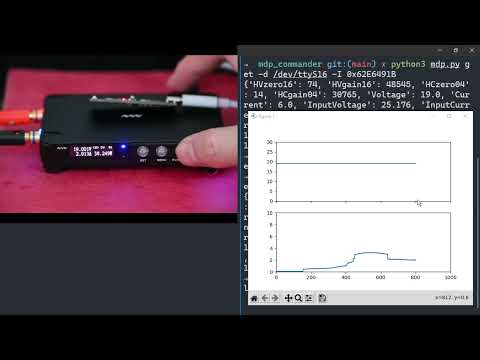
The MDP-M01 and MDP-P906 are using nrf24 to communicate with each other, so with nrf24 we should be able to communicate with the power supply from PC. After some reverse engineering and coding, here it is.
You need one arduino-compatible board and one nrf24l01 module. I'm using emakefun/rf-nano: emakefun arduino nano V3.0 + nrf24L01+ (github.com) which integrating the nrf24L01+ wireless chip based on the official standard Arduino Nano V3.0 motherboard . Compile the code in nrf24_adapter directory and Flash it. This adapter will receive AT command on serial.
Install uv, then sync the core Python dependencies into a project-local environment:
uv syncThe optional plotting dependencies can be installed with:
uv sync --extra plotCheck that the adapter is available:
uv run mdp adapter-info -d /dev/ttyUSB0The adapter firmware keeps the original 115200-baud text protocol. AT+INFO
reports firmware state and AT+STAT reports the transmit, no-ack, receive, and
invalid-command counters.
On Linux, the user running the command must have permission to access the serial device, commonly through the dialout group.
Pairing changes the P906 radio address and channel. Keep the adapter close to the P906 and run:
uv run mdp match -d /dev/ttyUSB0 -a 153614fae1 -c 50Save the device ID printed by the command; subsequent commands require it. Channels 0 through 125 are supported. Pairing temporarily listens on channel 78 before moving the device to the selected channel.
from mdp_commander import P906
from serial import Serial

with Serial('/dev/ttyUSB0', 115200, 8, 'N', 1, timeout=0.5) as serial_port:
    power_supply = P906(serial_port, 0x153614fae1, 50, 0x62E6491B)
    power_supply.connect()
    power_supply.setOutputVolt(12.0)
    power_supply.setOutputCurr(5.0)
    power_supply.switch(True)
    print(power_supply.getRealtimeValue())
The old from mdp import P906 import remains supported for compatibility.
uv run mdp get -d /dev/ttyUSB0 -I "${MACHINEID}"
{'HVzero16': 74, 'HVgain16': 48545, 'HCzero04': 14, 'HCgain04': 30765, 'Voltage': 23.1, 'Current': 0.2, 'InputVoltage': 25.271, 'InputCurrent': 2.072, 'OutputEnabled': True, 'OutputState': 'cv', 'Locked': False, 'Temperature': 34.0, 'RealtimeValues': [(23103, 1), (23103, 4), (23103, 4), (23103, 1)], 'ErrFlag': 0}
recently adc data(corrected, in mV/mA): [(23103, 1), (23103, 1), (23103, 4), (23103, 1), (23103, 1), (23103, 1), (23103, 1), (23103, 1), (23103, 4)]

uv run mdp set switch off -d /dev/ttyUSB0 -I "${MACHINEID}"
uv run mdp set voltage 3.3 -d /dev/ttyUSB0 -I "${MACHINEID}"
uv run mdp set curr 4 -d /dev/ttyUSB0 -I "${MACHINEID}"
uv run --extra plot mdp plot -d /dev/ttyUSB0 -I "${MACHINEID}"
OutputState is off, cc, cv, or on; every state except off means the
output is enabled. ADC values are rounded to the nearest mV/mA. Live plotting
samples on a background thread so serial timeouts do not block the UI.
uv run mdp.py ... remains available as a compatibility entry point.
uv sync
uv run pytest -q
Build the RF-Nano firmware with the pinned PlatformIO environment:
pio run -d nrf24_adapterFor the ATmega328P Nano with the new bootloader used by the tested RF-Nano, upload it with:
pio run -d nrf24_adapter --target upload --upload-port /dev/ttyUSB0- This are all based on reverse engineering. NOT well tested, It may damage your power supply. Use it at your own risk.
- Protocol are not complex
- P906 is very slow response when you lower the Voltage. It will not be immediately drop to the set value.
- The communication distance is very short, the nrf24 module should be really close to P906. (Code in P906 are using max PALevel already, but signal are too weak, It may be caused by the metal casing and heat sink)
- see waht @market84 has found inside the MDP-M01: extending the antenna