Repository navigation
How It Works
English · 中文
The model doesn't paint pixels. It writes a program that, given a time t, draws the frame at t. A renderer (headless Chrome, Manim or Blender) calls that program once per frame, and FFmpeg joins the frames and the sound into an MP4. OpenVideoHarness is the craft around that loop: what to build, in what order, and how to check it. The rules themselves are in CLAUDE.md (the agent's entry point; AGENTS.md is an identical copy for Codex and other agents) and in the playbook. The README's What's in the box lists the tools; this page explains how they fit.
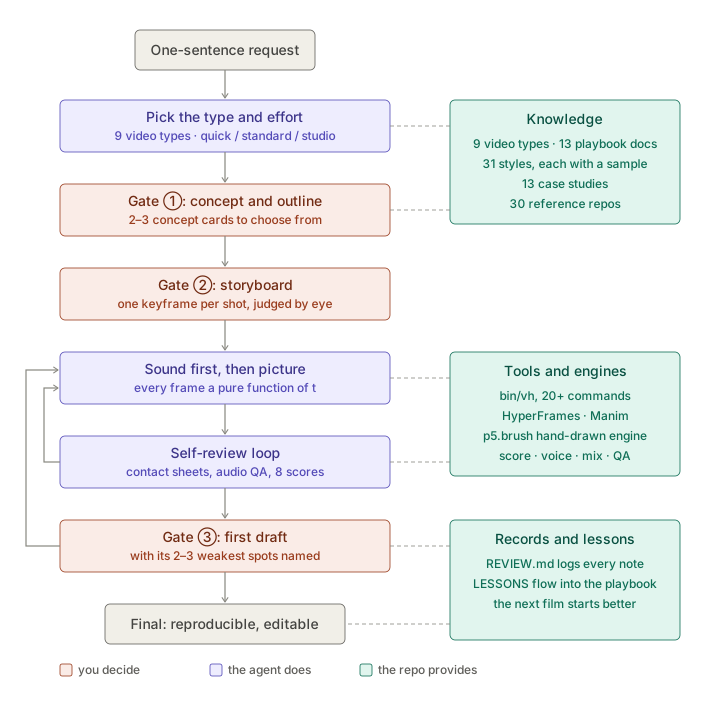
Because every frame is a pure function of t, three things follow:
- It's deterministic. The same t always gives the same frame, so rendering can run in parallel, resume after a stop, or jump to any moment.
- It can check itself. Any moment can be rendered on its own, so the agent lays frames out on a sheet and looks at them. It can't watch video or hear audio: it sees still frames and reads transcripts, timestamps and loudness numbers.
- It can be forked. A new language, song or style is a code change and a re-render.
Engines: HyperFrames (HTML + GSAP) by default; canvas-film for long narrated films whose shots and captions hang on the narration's words, with an optional Three.js layer for 3D; the bundled ClaudeAnimationBase (p5.js + p5.brush) for hand-drawn work; Manim CE for exact math, with ManimGX as an optional faster backend; Blender for path-traced shots; generative video with a code layer on top when you need real people or real physics. What each draws is in the README's Engines table, and the selection table is in playbook/00.
One contract for web-page engines. A page that writes window.film (its length, frame rate and a way to draw frame k) gets the same tools whatever drew it: bin/vh frames takes lossless frames, render makes the MP4, determinism checks hard rule 1, patch redraws a few seconds of a finished film. render draws one-GOP chunks in parallel browsers, resumes a stopped render, estimates a long one before it starts and keeps each render as a version (bin/vh versions). --motion-blur N averages N sub-frames into each frame (a cut stays a cut), and --alpha writes a transparent film to lay over footage. The contract is in engines/CONTRACT.md.
Blender, driven by code. Some pictures a web engine can't give: real glass refraction, nebulae and volumetric light, real depth of field, motion blur on a million particles. For those the agent writes Python that drives Blender 5.2, and the frame is still a function of t: numpy works out where every point is at t, Cycles path-traces the plate, and the plate joins the web engine's type and UI in the same film. The intro film's 15.8 s opening and the tabletop-miniature style swatch were made this way. When a shot needs no path tracing (a turntable, a building growing, a character's few steps), Blender only gets the asset ready (tidied, rigged, exported as GLB) and canvas-film's Three.js layer films it; bin/vh model3d check --blender checks the model first. The bpy scripts run with none of your environment variables, and on macOS in a sandbox with no network. When it is worth it: engines/blender.md, partly verified. Files that import bpy are GPL-3.0-or-later; the rest of the repo stays MIT.
| Stage | Output |
|---|---|
| 0 Route | video type and engine, from the routing table in CLAUDE.md
|
| 1 Material, concept, brief, outline | the material list in NOTES.md; 2–3 concept cards; BRIEF.md (concept, audience, platform, length, frame, frame rate, resolution, where it's watched, sound, acceptance) and a 3–7 part outline → gate ①
|
| 2 Style |
STYLE.md: palette, type, easing, safe area, bans, all following from the concept; any preset it borrows from is noted in DECISIONS.md
|
| 3 Script + storyboard |
SCRIPT.md when there is narration, STORYBOARD.md with the reads of every shot, keyframe pages per section; for a long film a full-length animatic, which can start as an edit list of grey slates → gate ②
|
| 4 Time basis | the clock everything hangs on: word timings for narration, the beat and bar map for music, or an event table for data; measured times written back into the storyboard |
| 5 Engine | render script, shared helpers, one sample scene; the same frame rendered out of order must match |
| 6 Scenes | one file per scene (or one entry per shot in an edit list); long films split into chapters |
| 7 Review | the 20-item checklist, then a scored review by a fresh-context reviewer |
| 8 Render | a draft first → gate ③ → the final |
| 9 Deliver | MP4, source, render commands, the asset ledger with credits, LESSONS.md; bin/vh deliver makes the copy to upload |
flowchart LR
  A["0 Route<br/>type + engine"] --> B["1 Concept, brief<br/>+ outline"]
  B --> G1{{"Gate ①"}}
  G1 --> C["2 Style<br/>3 Storyboard"]
  C --> G2{{"Gate ②"}}
  G2 --> D["4 Time basis"]
  D --> E["5–6 Engine + scenes"]
  E --> F{"7 Review<br/>20 items · 8 scores"}
  F -- fails --> E
  F -- passes --> H["8 Draft"]
  H --> G3{{"Gate ③"}}
  G3 -- notes --> E
  G3 -- approved --> I["8 Final<br/>9 Deliver + lessons"]
Pass conditions for every stage: playbook/01-pipeline.md; bin/vh commands --stage <n> lists the commands for each.
Before style, recipes or the type's defaults, the agent looks for the film's concept: a device you can say in one sentence that makes the form itself tell the content, such as "the 3 seconds after Enter, slowed down to 2 minutes, with a clock on screen". Telling the material directly, accurately and with feeling is a concept too; a device that makes the content harder to follow loses to plain telling. The agent lists what only this material has (numbers, quotes, objects) in NOTES.md, thinks up its own directions before it opens the style library, the recipes or the case studies, and then narrows them to 2–3 concept cards. Each card says the look it leads to (its own, or borrowed from one or more presets) and the hook, so picking a card at gate ① settles all three. One test of a concept: it fails on another subject; if it still works, it is only a style. The method is in playbook/12 (with optional helpers: bin/vh concept roulette and board), and cases/oneshot-five.md breaks down five community films that each start from one idea.
Floors and taste defaults. The checklist tags its floor items, the ones that keep a film legible, correct and safe: the safe area, reading time, text size, no text burnt out by light, reads that nothing covers, loop seams, beat hits the storyboard declares, no placeholders or invented facts, and no digital silence in a film with sound. They hold for every concept and every effort level. Everything else (the type docs' registers and beat orders, the motion defaults, the recipes, the style presets, the checklist's other items) is a safe starting point when there is no concept yet: a film that needs something else simply does it, and a decision worth sharing goes into DECISIONS.md.
The frame, resolution, frame rate, length and where the film is watched are set when the project is made, with defaults per type (bin/vh new … --aspect --watch --res), and gate ① lists them as decided for you. The agent asks only when no platform was named and the answer would change the frame or the text size. Where it is watched (Watch on: in the BRIEF) sets the smallest text, in 1080p composition pixels:
Watch on |
What it means | Titles | Labels | Captions |
|---|---|---|---|---|
phone |
a vertical phone (also 1:1, 4:5 and 3:4) | ≥ 84 | ≥ 44 | ≥ 65 |
desktop |
a computer, or a phone turned sideways (Bilibili, YouTube, a website) | ≥ 84 | ≥ 44 | ≥ 48 |
feed |
a landscape film in a phone feed, phone held upright (Douyin, WeChat Channels, Xiaohongshu, Weibo, X) | ≥ 150 | ≥ 80 | ≥ 115 |
The readability check scales the contact sheet to that screen (360 px per frame for phone and feed, 640 for desktop). 4K (Resolution: 4k) is written at 1080p and rendered at twice the size, so text looks the same size on screen. Details: playbook/01 (规格) and playbook/03 §4.
Human judgment is worth most while changes are cheap. Changing a storyboard takes minutes; changing finished code takes hours. So the agent stops three times (concept and outline, storyboard with a keyframe sheet, first draft) and waits. It skips a gate only when you choose quick or say plainly in the chat that you don't want to review. Your exact words and the date go into REVIEW.md, and at standard or studio a fresh-context reviewer stands in for the gates you skipped. A whole standard or studio film won't render before gate ① is on record.
Effort says how hard the agent checks its own work. Director mode says what you decide. Twelve decisions can be named: concept, spec, outline, style, main character, theme music, voice, script, hook, storyboard, edit rhythm, and title and cover. Each one is handled in one of three ways:
| What happens | |
|---|---|
own |
The agent shows options with a recommendation, then waits for you |
review |
It shows one result on the next page and carries on; if you say nothing, it stands |
delegate |
It decides, writes down why in DECISIONS.md, and you can overrule it any time |
Name the ones you care about in the chat, on the Director: line of BRIEF.md, or as a default in LOCAL.md: Director: hook=own, character=own, theme=own, packaging=own, rest=delegate. Decisions nobody named follow the effort level. At quick everything is delegated. At standard the concept is yours to pick (its card carries the style and the hook, unless you name those separately), the outline and storyboard are reviewed and the rest is delegated; studio is the same but reviews the rest too.
The three gates stay the floor for standard and studio: director mode adds stops and never removes one. It adds them at six checkpoints, in time order, and you only stop at the ones you ask for (stop=E3 adds one by name):
| Checkpoint | When | What you can decide |
|---|---|---|
| E0 style frames | before the storyboard | the main character, the theme melody (two short audio drafts and a score picture); the style, when all you can say is "it doesn't feel right" (look-dev variants) |
| E1 script | before the storyboard | the voice, chosen with the script so that line lengths are measured on it; the script; the hook |
| E2 sound | before the music is written | where the theme plays and where it stays quiet |
| E3 timing lock | after the audio is made | you hear the final voice and music once, then the timeline is locked; changing a line later costs a re-time |
| E4 sample chapter | start of scene writing, long films | the first chapter, built by hand as the standard for the rest |
| E5 picture lock | after gate ③ | after this only sound, colour and the ending change |
Each decision has a first checkpoint where it can be made, and a cost for changing it later (the page says "now: low · after the storyboard: high"). The table of all of this is in playbook/01; CLAUDE.md has the rules, and the README has a plain-language version.
Every stop is one command: the agent writes what it needs from you into out/review/gate-<n>.json and runs bin/vh gate <project> <n>, which builds the page (gate-<n>.html, the latest also index.html) and prints the few lines for the chat. From the top:
-
The decisions that need you, at most 3 by default. Each has a recommended option, the reason, what changing it later would cost, and how to reply (
H1 / H2), then one line that accepts every recommendation. - Pictures and options for each decision, side by side where possible. Sound comes as playable files, with a plain note on what the agent couldn't hear.
- For the storyboard, one page per section: keyframes, that section's stretch of the animatic, and the shots the agent is least sure about in red.
- A folded appendix for what doesn't change your decision.
It opens straight from disk, follows your light or dark theme, and comes in English or Chinese after your first request. A choice or two in plain text can still go straight into the chat. Your replies are copied word for word into REVIEW.md.
At studio (or whenever you ask, bin/vh gate … --desk) the stop is the review desk (bin/vh desk): a local page where you mark each item ok, change or question, add a line and submit. The agent waits in the background (bin/vh gate … --wait) and carries on when you submit. bin/vh status <project> says which stops are done and whom the project is waiting for.
Judging a storyboard or a style shouldn't mean reading a table, so small commands build the pictures:
| Command | What you get |
|---|---|
bin/vh storyboard <project> |
pages from shots.json: a keyframe per shot with its times, length, reads and camera (a shot-grammar card), least-sure shots in red, too-long shots flagged |
bin/vh rhythm <project> |
one time axis with shots, narration, captions, on-screen text and the music's sections and hits; shots longer than the type's "new payoff every N s" and texts too short to read in red |
bin/vh style compare a,b,c |
presets side by side, as posters or at the same moment of each swatch; bin/vh style apply attaches the ones you pick as references |
bin/vh cover-preview <image> |
a cover at the real size of each feed slot (Bilibili, Douyin, YouTube, Xiaohongshu) with the platform's overlays, and a small-text legibility check; bin/vh frames --covers picks cover frames by cue, in other ratios too |
bin/vh music … --roll |
a piano roll and a loudness curve for each part: a picture of the music for a reviewer who can't hear it |
bin/vh readcheck <project> |
the on-screen text and how long each one stays; --budget <s> says how many characters fit in a span, on screen, as subtitles and spoken |
For a keyframe nobody is sure of, a target image and a critic can stand in for guessing (playbook/target-critic.md).
A read is one thing the viewer must understand. Each shot lists its reads in order, each with a start and end time. A read needs time to be found, understood and digested, and two important reads never overlap. If the reads don't fit, the shot gets longer or loses a read; nothing gets squeezed. How long a read stays follows the film's Pace in the BRIEF, above a floor of being readable once. Pacing is where AI video most often fails, which is why the storyboard comes before any code. (The idea comes from ClaudeAnimationBase's ANIMATION_GUIDE.md.)
The project picks one clock and everything hangs on it: a narrated film uses the voiceover's word timings, a music film the song's beat and bar map, a data film can use an event table and reading times. Picture, sound and text read the same times (bin/vh cues shows where a page's cues landed and which ones a new take moved; bin/vh timeline and remap keep typed seconds following a new take), so nothing is timed by hand twice. A silent video takes its length from the reads and must make sense with the sound off. See Sound and Voice.
A film doesn't have to be one page. edit.json lays it out as a row of entries, each drawn its own way: a page (one engine per chapter, if you like), an image with a push, a colour, a grey slate still to be made, a clip of footage, another project's film, and tracks of sound. bin/vh edit init turns the shot table into one, every shot a slate timed as planned, which is gate ②'s full-length animatic; the slates are then replaced one by one. bin/vh render builds the list, puts a keyframe at every cut and keeps each finished chunk, so a render after a change draws only the entries that changed; check, patch and deliver read the same list, and a film with a slate left can't be delivered. The format is in engines/EDIT.md.
Every file a film uses goes on the project's asset ledger (bin/vh assets, assets/ledger.json): where it came from, its licence and what it cost. bin/vh assets check compares the ledger with what each page actually loaded, credits writes the credits and AI labels, and deliver reports the check's verdict with what the upload owes (under Assets: strict in the BRIEF, a failed check stops the delivery). The commands that bring material in write to it themselves:
-
Footage:
bin/vh footagesearches Internet Archive, Wikimedia Commons and NASA and takes only the seconds you need. -
Pictures:
bin/vh image genmakes them with Gemini's Nano Banana or Codex's image_gen, with transparent cutouts;bin/vh castsettles a project's characters, costumes, props and sets as reference pictures, andimage gen --ref cast:<id>sends them along so a character looks the same in every shot. -
Sound:
bin/vh sfxandbgmsearch your own sound library and Openverse;sound addfiles a sound into the library. -
3D:
bin/vh model3d checkreads a model before it goes in, andbin/vh hdritakes a CC0 environment map from Poly Haven.
Paid calls need a budget. A paid call (a generated picture or video, a generated music track, bought material) is held against the project's budget before it is made: the BRIEF's Budget: line, or a default in LOCAL.md. With no budget the call is refused, and a call that would go over stops and says how much is missing. Keys are read from environment variables, never from files.
A style gives a film its skin; the library gives its shots their bones. Recipes say how one shot or seam moves (its phases in frames, the parameters that mustn't drop, where it goes wrong), and whole-film skeletons set the energy arc and the holds of a whole film; bin/vh recipes list --intent … --energy … filters them. Shot-grammar cards cover shot sizes, angles, the axis and camera moves, and a shot's choice is its camera line on the storyboard page. Components are motion computed from t with thin painters for canvas, the DOM or Three.js (bin/vh components add). bin/vh know <words> says what the repo knows about something before anyone reads the docs. All of these are defaults to start from, not rules. Counts and examples: the README's Recipes, shot-grammar cards, components.
The agent checks its work in layers, cheapest first (playbook/02):
- Does it run? Lint, compile, dry-run.
-
Checks without looking. Bounding-box overlaps, frame counts, determinism spot checks;
bin/vh textcheckmeasures canvas text in the Chrome that renders the film (covered by the picture, too faint, out of frame) andbin/vh fontschecks every character is in the font it asks for. - Looking at stills. A contact sheet for composition, a strip of consecutive frames for timing, a crop for faces and details; each cut ±0.5 s on its own; a sheet scaled to the target screen (360 px per frame for a phone or a phone feed, 640 for a computer).
- Critique as a choice. A vision model picks from grid positions or rendered variants instead of guessing pixel offsets.
-
A reviewer who didn't make it. A fresh-context agent plays a harsh motion director. It first writes what this film is trying to do, then scores the draft against that; it sees the frames, the checklist, the storyboard, the BRIEF's concept and the decisions in
DECISIONS.md, never the author's notes. - Whole-film viewing (optional). Gemini can read a video, but it samples about one frame per second: fine for the story, blind to fast motion.
- You. The final call on taste and sound.
Every draft has to clear the checklist (TASTE_CHECKLIST.md):
-
20 pass/fail items across composition, text, colour, motion, pacing and content. The floor items must pass whatever the concept; the others are advice, and the author may decline a fix with a one-line reason in
NOTES.md. -
8 scored dimensions (1–10): concept (did the chosen idea land on screen?), hook, target-screen readability, motion quality, variety, composition and polish, content accuracy, audio-visual sync. They measure whether the film became what it set out to be, not whether it matches a style. At
standardthere is one round with no score bar: the reviewer names at most the three most important problems and the author fixes them or says why not. Atstudiothe five craft scores (readability, motion, polish, accuracy, sync) must each reach 7, and concept, hook and variety are judged against the film's own concept. A film gets at most 10 whole-film reviews, and one kind of problem at most 5 tries; what still doesn't pass goes intoNOTES.mdas a known limit for you. The scorer is never the author: when the first 26 style swatches were reviewed, their makers scored themselves 1–2 points higher than the independent reviewer did.
Then the rendered film itself is checked. bin/vh check compares it with the BRIEF (length, frame, frame rate, and a 4K render against the approved 1080p cut) and finds black, frozen or silent stretches, one-frame glitches, flashes, still stretches, cuts that flash, subtitles too short to read, missing colour tags and the wrong loudness, and names a way out of each finding. Sound is measured the same way: bin/vh qa scans the mix for digital silence, dropouts, pumping and clicks, reads the score so a note's attack isn't a click, checks that every cue lands within one frame, and with --listen N cuts out the places a person should hear. For a profile= mix it also writes a mix report: how far the music sits under each narration line, which words are at risk of being masked, and whether the sound effects fall in their class ranges.
One switch sets how much of all this happens (see "努力程度" in CLAUDE.md, or run bin/vh effort). All three levels deliver a full-quality film; the level sets how often it stops and how many review rounds it runs:
quick |
standard (default) |
studio |
|
|---|---|---|---|
| For | one line in, a finished film out; also for trying a direction | real videos where you want to decide at the gates | launches and flagship pieces, polished over rounds |
| Gates | none (decisions you name still stop) | ① ② ③ on a review page | ① ② ③ on the review desk, plus a 10–20 s sketch per concept card and a full-length animatic |
| Concept | two or three one-line ideas, pick one | 2–3 concept cards at gate ①, one frame each | the same, each with a 10–20 s sketch |
| Self-review | a contact sheet of the whole film, one scaled to the target screen, a strip of the first 2 s | new and changed scenes and their seams: sheets, strips, crops | the same, plus the target-screen test, loop seams, lossless determinism, a scan for silent failures |
| Scored review | none | 1 round, the three most important problems fixed, no score bar | 3 to 10 rounds; the five craft scores at 7 or above |
| Sound | what the film needs: score or voice, key-action SFX, a mix profile and bin/vh qa
|
the same | the same, plus foley and panning for every action and a mix report with no hard failures |
| Subagents | usually none | one to three for the film | chapters in parallel, plus the reviews |
| A 30 s film takes about | 10–30 min | 1–2 h | 3 h or more |
Only you can lower the level; the agent may not downgrade to save time. Some things hold at every level: every frame a pure function of t, facts copied from the source, no API keys in files, no digital silence mid-film (in a film with sound), at most 3 full-screen white flashes per second, text no smaller than the floor for where the film is watched, licences on record in the asset ledger, no paid call without a budget, the checklist's floor items, and a bin/vh check before delivery.
- Every frame is a pure function of t: no
Math.random(),Date.now(), CSS transitions or@keyframes, no state carried between frames; use seeded hashes. Any frame rendered alone must match the same frame in the full render. - One clock: picture, sound and text share the project's time basis (word timings, a beat map, an event table) instead of typed seconds.
- Plan before building: what each section says and which reads the viewer takes in, when, before any code.
- Check the actual result: new and changed parts and their seams in detail, the rest spot-checked; a fresh-context reviewer for the whole draft.
- Facts are copied from the source, publishing copy included; anything uncertain goes into
NOTES.md, not the video. - Work only inside
projects/; engines are templates and references are read-only. - No API keys in files; read them from environment variables.
When rules conflict: what you say in the chat; then the floors (the hard rules, the floors listed above, the gates, and anything on facts, licences, readability, privacy and consent); then the concept card you approved and the project's own STYLE.md and DECISIONS.md; then the type doc; then the recipes; then playbook/; then external references.
Every project keeps a LESSONS.md. General lessons move into playbook/, a type doc's checks, a recipe or a tool, so the next film starts better. Many rules in the repo began this way. For example, "a dramatic stop is a held breath, never digital silence" came from the intro film: its second version paused on true silence, and the user heard the music stall.
Some of the rules above came from measurements. docs/research/ has eight lab notes, in Chinese and in English. Each gives the question, how it was measured, the numbers, what changed in the repo and what is still unclear:
- voice, music and sound-effect levels, behind the mix profiles;
- 28 soundtracks: how to measure "too similar";
- same code, different pixels: why the swatches now render on the CPU;
- how long on-screen text has to stay, behind
bin/vh readcheck; - chapters, motif and dynamic arc, behind playbook/11;
- concept first against floors only, an A/B on two one-line requests: behind the
quickpath's two extra self-checks, and the question that led to the text-size floors by screen; - does the film move? still stretches, cuts that flash and periodic motion, behind
bin/vh check's motion findings; - ManimGX as a Manim backend: showcase 03 moved over, about 5× faster, the same film to the eye but not the same pixels.
They are records, not rules (the rules stay in the playbook), and mostly meter readings rather than listening verdicts.